




如果需要在虚拟机中访问UNRAID宿主机的文件又需要高性能(如大文件或大量文件读写场景)时,可以使用VirtIO FS特性来实现。 UNRAID中的虚拟机中提供了VirtIOFS共享模式。
UNRAID虚拟机设置
配置unraid界面: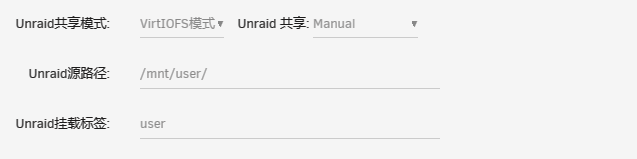 或手动修改XML:
<filesystem type='mount' accessmode='passthrough'>
   <driver type='virtiofs' queue='1024'/>
   <binary path='/usr/libexec/virtiofsd' xattr='on'>
     <cache mode='always'/>
     <sandbox mode='chroot'/>
   </binary>
   <source dir='/mnt/user/'/>
   <target dir='user'/>
   <alias name='fs0'/>
   <address type='pci' domain='0x0000' bus='0x01' slot='0x00' function='0x0'/>
 </filesystem>
配置Debian虚拟机
Debian12默认没有加载virtiofs模块,因此需要手动加载该模块
打开
/etc/modules文件:sudo nano /etc/modules在文件末尾添加以下内容:
virtiofs创建一个文件来设置模块参数:
sudo nano /etc/modprobe.d/virtiofs.conf在文件中添加以下内容:
options virtiofs cache=always
保存并关闭文件。这将确保 virtiofs 模块在加载时带有指定的参数。
请注意,为了使更改生效,你可能需要重新启动系统或重新加载相关的内核模块
在虚拟机中装载
要挂载分区,请在 fstab 中添加一行源代码名称 以及要挂载它的目录。在此示例中,我们安装 从 /home/user导出的目录,该目录将称为 user。它将挂载在路径 /mnt/user中 虚拟机。
user /mnt/user virtiofs rw,relatime 0 0或手动挂载:
mount -t virtiofs user /mnt/user
评论区